PostgreSQL snapshots
What are snapshots in PostgreSQL, how do they work, and why you might need them.
Snapshots are a key part of achieving Isolation in ACID. Let’s break it down quickly. ACID recap:
Atomicity → All or nothing (transaction commits fully or rolls back).
Consistency → Database moves from one valid state to another (constraints, triggers, etc.).
Isolation → Transactions don’t interfere with each other, even when running concurrently.
Durability → Once committed, data survives crashes.
Where snapshots fit: the I in ACID (Isolation)
PostgreSQL uses MVCC (Multi-Version Concurrency Control) to provide snapshot isolation (the default isolation level is READ COMMITTED).
Here’s what happens:
- When your transaction (or even a single statement) starts reading data, PostgreSQL gives it a snapshot, a frozen view of the database as it existed at that moment.
- While you read, other transactions can insert, update, or delete rows.
- Your transaction only sees:
Data committed before your snapshot.
Changes made by your own transaction. - It ignores changes committed after your snapshot started (until you finish and start a new statement/transaction).
This guarantees perfect read consistency without locking rows for reads, readers never block writers, and writers never block readers.
The concept of transaction isolation is part of the ACID standard in all relational databases, the way it is implemented varies. PostgreSQL uses MVCC with snapshots to provide isolation without read locks. Many other databases (MySQL InnoDB, Oracle, SQL Server) also use MVCC and similar snapshot-like mechanisms. So, snapshots (or their equivalent) are common in modern databases.
What Is a Snapshot?
A snapshot is a read-consistent view of the database at a specific moment in time.
It lets you see the data as it was when your transaction started, even if other users are changing it right now (thanks to MVCC, Multi-Version Concurrency Control).
It is not a backup, a common misconception! Snapshots are for consistency during queries, not for restoring lost data.
Why Snapshots matter
Imagine running a long report query while someone else is updating the same tables.
Without snapshots, you might see half-updated data (inconsistent results).
With snapshots, your query sees a frozen, consistent version from the start.
How Snapshots work in PostgreSQL
Every transaction gets a snapshot when it begins.
PostgreSQL keeps old row versions (in the heap) until no active snapshot needs them.
Vacuum cleans up dead rows once all snapshots are gone.
VACUUM and Dead rows
When a row is updated or deleted, PostgreSQL doesn’t immediately remove the old version, it marks it as DEAD (invisible to new transactions). These dead rows are kept temporarily in case any active snapshot (from a running transaction) still needs to see them. The VACUUM process cleans up these dead rows and frees space once no snapshot needs them anymore. PostgreSQL runs autovacuum automatically in the background to do this regularly. Without vacuuming, the table would keep growing (table bloat), wasting disk space and slowing down queries.
Example
Let us take a look how it works with two session in PostgreSQL.
I have two PostgreSQL sessions open. In the first session I execute a SELECT statement, in the second session I execute an UPDATE statement.
- Session 1
SELECT * FROM product WHERE name = ‘Smartphone’;

As you can see, in_stock is false.
2. Session 2
BEGIN; (to start the transaction)
UPDATE product SET attributes = attributes || ‘{“in_stock”: true}’
WHERE name = ‘Smartphone’;

3. Session 1
SELECT * FROM product WHERE name = ‘Smartphone’;
You STILL see the old version!
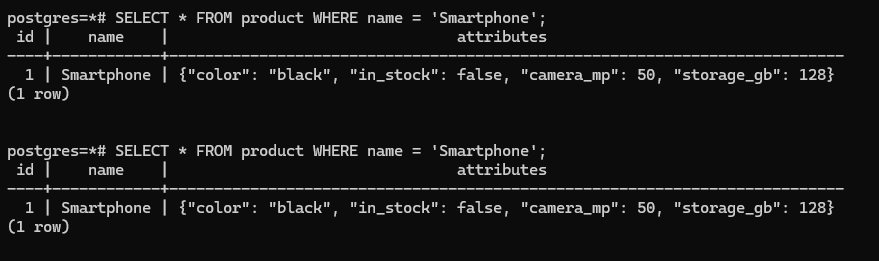
4. Session 2
I enter COMMIT; to confirm the transaction.
5. Session 1
SELECT * FROM product WHERE name = ‘Smartphone’;
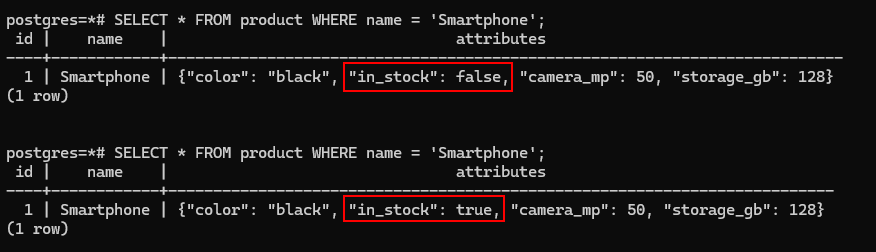
As you can see, the value false has only now changed to true.
Exporting a Snapshot
(For logical backups)
pg_dump uses a snapshot to get a consistent dump.
You can even export the snapshot identifier: SELECT pg_export_snapshot();
Useful for tools that need the exact same view (as replication, testing).
Physical Snapshots
Tools like pg_basebackup or file-system snapshots (LVM, ZFS) can create point-in-time copies of the entire data directory.
But, these are physical, not the same as MVCC snapshots.
Common misconceptions
Snapshots are backups → No! They disappear when transactions end.
I can restore from a snapshot later → No, unless you used pg_dump or physical backup.
Snapshots hurt performance → Only if long-running transactions prevent vacuuming.
Quick tips
Avoid long-running idle transactions (they block vacuum).
Use SELECT pg_current_snapshot(); to see your current snapshot.
What is pg_current_snapshot()?
This function returns a text representation of the transaction snapshot your current session (transaction) is using right now.
A snapshot defines:
Which transactions were already committed when your transaction started (visible to you).
Which transactions are ignored (too new or in-progress).
It’s the core of PostgreSQL’s MVCC isolation.
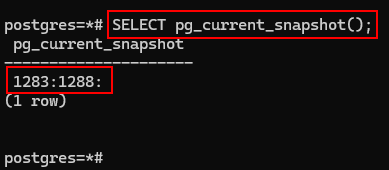
The output format is:
xmin:xmax:xip_list
In our case: 1283:1288:
1283 = xmin (horizon for old rows)
The lowest transaction ID (XID) still considered active. Any transaction with XID < 1283 is either committed and visible or vacuumed away long ago.
1288 = xmax (horizon for new rows)
The highest transaction ID that is not visible yet. Transactions with XID ≥ 1288 are either in progress or committed after your snapshot was taken, so you can’t see their changes.
: (empty after the second colon) = xip_list (active transactions list)
The list of transaction IDs that were in progress when the snapshot was taken. The query ignores changes from these XIDs (except my own).
It’s empty here because no other transactions were running at the exact moment the snapshot was created.
Note: I started this blog with BEGIN; and simply continued the commands for the screenshot. After the COMMIT; statement, the output changed to:
postgres=*# COMMIT;
COMMIT
postgres=# SELECT pg_current_snapshot();
Note: see the difference between postgres=*# and postgres=#?
pg_current_snapshot
1288:1288:
(1 row)
Conclusion
Snapshots are what make PostgreSQL safe for concurrent reads/writes.
They’re automatic and invisible most of the time, but understanding them helps you debug weird issues and write better long-running queries/reports.
This brings us to the end of my post on PostgreSQL snapshots.
Thank you for taking the time to read my post on PostgreSQL snapshots.
I hope you found it enjoyable and insightful.
Stay tuned for more content that is coming soon.
If you like what you read, please consider sharing it with others who might find it helpful.
Contact me
If you have any questions or want to contact me, please drop me an email at info@safecomputer.org
Stay updated with my monthly newsletter
Subscribe to Safe Computer’s monthly newsletter in the right sidebar for tips on job applications, cybersecurity, and more! Get summaries of my latest posts, like this Database Crimes, straight to your inbox. Join now at safecomputer.org!
Disclaimer
All tips and methods mentioned in this blog are tested on Windows 11. Please note that results may vary on other operating systems or versions of Windows. Adapt the instructions accordingly.
Copyright
© 2025 Henny Staas/safecomputer.org. Unauthorized use and/or duplication of this material without express and written permission from this site’s author and/or owner is strictly prohibited. Excerpts and links may be used, provided that full and clear credit is given to Henny Staas/safecomputer.org with appropriate and specific direction to the original content.