JSON in PostgreSQL
PostgreSQL’s JSONB type is fast, indexable, and incredibly flexible for semi-structured data. But it’s not a silver bullet, sometimes a traditional normalized table is still the better choice.
Since I have PostgreSQL running on my laptop, I’ll show you real examples you can copy-paste and run yourself, complete with actual psql screenshots.
When to use JSONB
1.
Semi-structured or highly variable data
When different rows need different fields (like product attributes where some items have color, others have battery_life, and some have neither), JSONB avoids endless schema migrations.
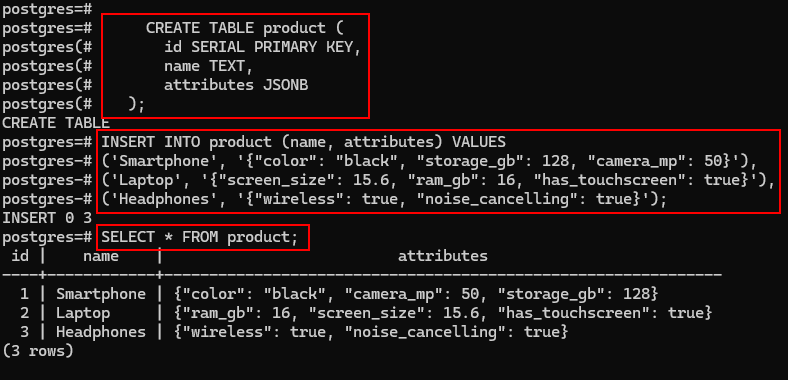
Create the table and insert sample data:
CREATE TABLE product (
id SERIAL PRIMARY KEY,
name TEXT,
attributes JSONB
);
INSERT INTO product (name, attributes) VALUES
(‘Smartphone’, ‘{“color”: “black”, “storage_gb”: 128, “camera_mp”: 50}’),
(‘Laptop’, ‘{“screen_size”: 15.6, “ram_gb”: 16, “has_touchscreen”: true}’),
(‘Headphones’, ‘{“wireless”: true, “noise_cancelling”: true}’);
Creating the table and inserting data in psql:
2.
Read-heavy queries with containment searches.
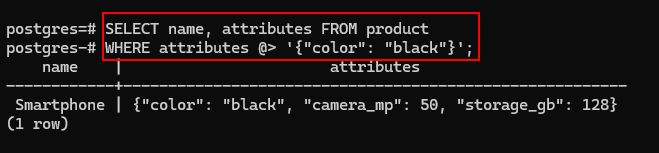
Use the @> operator to find rows containing specific JSON keys and values.
Example:
SELECT name, attributes FROM product
WHERE attributes @> ‘{“color”: “black”}’;
Query result in psql:
3.
Add a GIN index for speed:
CREATE INDEX idx_product_attrs ON product USING GIN (attributes);
(attributes = the JSONB column name)
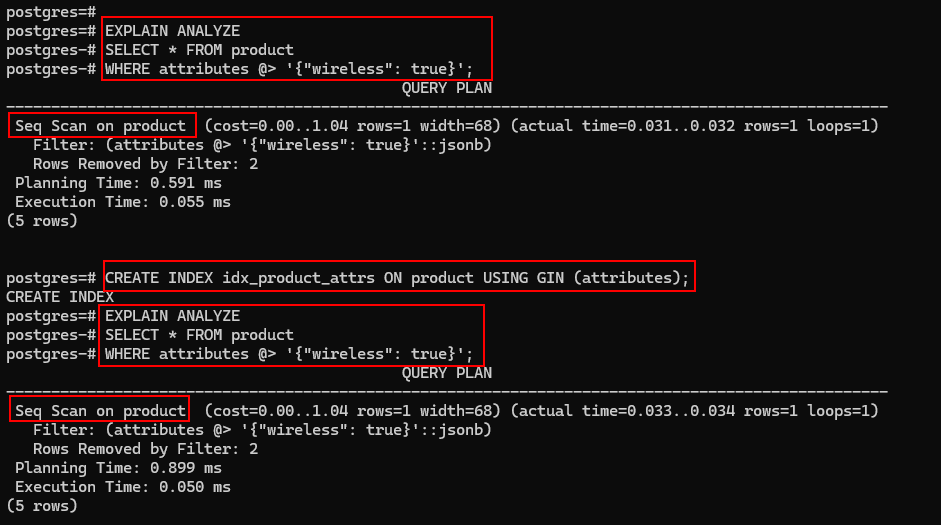
Creating the GIN index:

This GIN (Generalized Inverted Index) index dramatically speeds up operators like @> (containment), ? (contains key), and path queries on large datasets.
Why the index might not show up immediately.
On our tiny 3-row table, PostgreSQL prefers a sequential scan because it’s cheaper than using the index.
EXPLAIN ANALYZE
EXPLAIN ANALYZE without forcing index use shows Seq Scan.
PostgreSQL is smart: with only a few rows, scanning the whole table is faster than the overhead of reading the index.
To see the index in action (for demonstration), temporarily disable sequential scans:
SET enable_seqscan = OFF;
EXPLAIN ANALYZE
SELECT * FROM product
WHERE attributes @> ‘{“wireless”: true}’;
(When done, turn it back on: SET enable_seqscan = ON;)
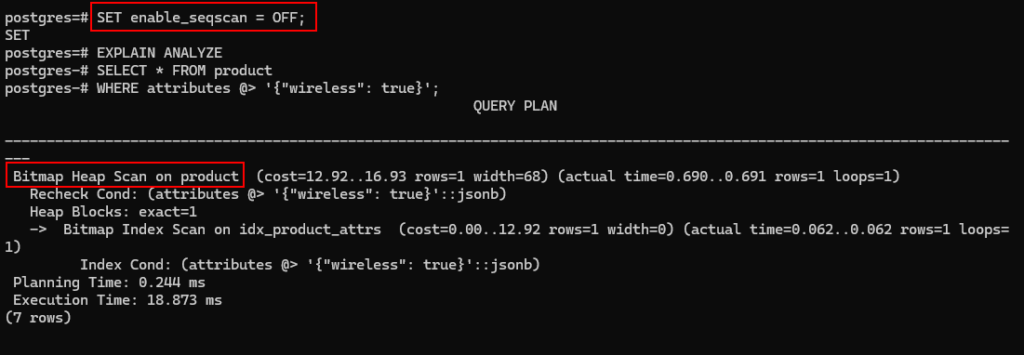
EXPLAIN ANALYZE with forced index use, shows Bitmap Index Scan using our GIN index.
On real-world tables with thousands or millions of rows, PostgreSQL naturally chooses the index, no forcing needed.
Other useful JSONB queries (fast with the GIN index)
Does it contain a specific key?
SELECT * FROM products WHERE attributes ? ‘noise_cancelling’;
Extract a single value
SELECT name, attributes->>’screen_size’ AS screen FROM products;
Nested data example
INSERT INTO products (name, attributes)
VALUES (‘Camera’, ‘{“specs”: {“megapixels”: 108, “zoom”: “10x”}}’);
SELECT * FROM products
WHERE attributes @> ‘{“specs”: {“megapixels”: 108}}’;
When not to use JSONB
Fequent updates to individual fields, jsonb_set rewrites the whole object.
Relational integrity needed (foreign keys, unique constraints).
Heavy reporting or aggregations — extracting and aggregating JSON fields is slow and messy.
Very large scale with strict validation needs.
Quick decision checklist
Use JSONB
Variable/evolving fields
Mostly reads, rare updates
Fetch whole object often
Use separate table
Frequent single-field updates
Foreign keys / constraints needed
Heavy aggregations / reporting
My rules of thumb (from real projects)
JSONB for: product variants, user settings, API payloads, logs.
Normalize for: anything heavily filtered, joined, or aggregated.
Best of both worlds: store core fields as regular columns, extras in JSONB.
JSONB is a powerful tool when used in the right situations, it complements normalization, it doesn’t replace it.
What’s your experience with JSONB? Horror story or lifesaver? Drop it in the comments. 🚀
This brings us to the end of my post on JSON in PostgreSQL.
Thank you for taking the time to read my post on JSON in PostgreSQL.
I hope you found it enjoyable and insightful.
Stay tuned for more content that is coming soon.
If you like what you read, please consider sharing it with others who might find it helpful.
Contact me
If you have any questions or want to contact me, please drop me an email at info@safecomputer.org
Stay updated with my monthly newsletter
Subscribe to Safe Computer’s monthly newsletter in the right sidebar for tips on job applications, cybersecurity, and more! Get summaries of my latest posts, like this Database Crimes, straight to your inbox. Join now at safecomputer.org!
Disclaimer
All tips and methods mentioned in this blog are tested on Windows 11. Please note that results may vary on other operating systems or versions of Windows. Adapt the instructions accordingly.
Copyright
© 2025 Henny Staas/safecomputer.org. Unauthorized use and/or duplication of this material without express and written permission from this site’s author and/or owner is strictly prohibited. Excerpts and links may be used, provided that full and clear credit is given to Henny Staas/safecomputer.org with appropriate and specific direction to the original content.